Showing posts with label internet. Show all posts

Domain extension country list with full form

List of Domain Extensions - Country List


This list will help you determine the country in which a website is based, if the extensions (the letters after the last dot) are not one of the common extensions (like .com, .org, .gov, .edu, etc.). But also notice that some countries allow foreigners and foreign businesses to register.  For example the Cocos Islands allows anyone in the world to buy a domain with the extension .cc).  Scammers that build websites to scam people use this as a way to disguise their true location or to pretend they are in another country.


A
  • .ac � Ascension Island
  • .ad � Andorra
  • .ae � United Arab Emirates
  • .af � Afghanistan
  • .ag � Antigua and Barbuda
  • .ai � Anguilla
  • .al � Albania
  • .am � Armenia *
  • .an � Netherlands Antilles
  • .ao � Angola
  • .aq � Antarctica
  • .ar � Argentina
  • .as � American Samoa *
  • .at � Austria *
  • .au � Australia
  • .aw � Aruba
  • .ax � Aland Islands
  • .az � Azerbaijan
B
  • .ba � Bosnia and Herzegovina
  • .bb � Barbados
  • .bd � Bangladesh
  • .be � Belgium *
  • .bf � Burkina Faso
  • .bg � Bulgaria
  • .bh � Bahrain
  • .bi � Burundi *
  • .bj � Benin
  • .bm � Bermuda
  • .bn � Brunei
  • .bo � Bolivia *
  • .br � Brazil *
  • .bs � Bahamas *
  • .bt � Bhutan
  • .bu � Burma (not in use since re-naming of country to Myanmar, see .mm)
  • .bv � Bouvet Island (not in use; no registrations)
  • .bw � Botswana
  • .by � Belarus
  • .bz � Belize *
C
  • .ca � Canada
  • .cc � Cocos (Keeling) Islands *
  • .cd � Democratic Republic of the Congo (formerly .zr � Zaire) *
  • .cf � Central African Republic
  • .cg � Republic of the Congo *
  • .ch � Switzerland *
  • .ci � C�te d'Ivoire (Ivory Coast)
  • .ck � Cook Islands *
  • .cl � Chile
  • .cm � Cameroon
  • .cn � People's Republic of China *
  • .co � Colombia
  • .cr � Costa Rica
  • .cs � Serbia and Montenegro (formerly .yu � Yugoslavia; Note: on June 3, 2006, Montenegro declared independence, thus dissolving the state union) (.cs code not assigned; no DNS) (.cs code previously used for Czechoslovakia)
  • .cu � Cuba
  • .cv � Cape Verde
  • .cx � Christmas Island *
  • .cy � Cyprus
  • .cz � Czech Republic
D
  • .de � Germany
  • .dj � Djibouti *
  • .dk � Denmark *
  • .dm � Dominica
  • .do � Dominican Republic
  • .dz � Algeria
E
  • .ec � Ecuador *
  • .ee � Estonia
  • .eg � Egypt
  • .eh � Western Sahara (not assigned; no DNS)
  • .er � Eritrea
  • .es � Spain *
  • .et � Ethiopia
  • .eu � European Union (code "exceptionally reserved" by ISO 3166-1)
F
  • .fi � Finland
  • .fj � Fiji *
  • .fk � Falkland Islands
  • .fm � Federated States of Micronesia *
  • .fo � Faroe Islands
  • .fr � France
G
  • .ga � Gabon
  • .gb � United Kingdom (Reserved domain by IANA; deprecated � see .uk)
  • .gd � Grenada
  • .ge � Georgia
  • .gf � French Guiana
  • .gg � Guernsey
  • .gh � Ghana
  • .gi � Gibraltar
  • .gl � Greenland *
  • .gm � Gambia
  • .gn � Guinea
  • .gp � Guadeloupe
  • .gq � Equatorial Guinea
  • .gr � Greece *
  • .gs � South Georgia and the South Sandwich Islands *
  • .gt � Guatemala
  • .gu � Guam
  • .gw � Guinea-Bissau
  • .gy � Guyana
H
  • .hk � Hong Kong *
  • .hm � Heard Island and McDonald Islands *
  • .hn � Honduras
  • .hr � Croatia
  • .ht � Haiti
  • .hu � Hungary *
I
  • .id � Indonesia
  • .ie � Ireland
  • .il � Israel *
  • .im � Isle of Man *
  • .in � India *
  • .io � British Indian Ocean Territory *
  • .iq � Iraq
  • .ir � Iran *
  • .is � Iceland
  • .it � Italy
J
  • .je � Jersey
  • .jm � Jamaica
  • .jo � Jordan
  • .jp � Japan
K
  • .ke � Kenya
  • .kg � Kyrgyzstan
  • .kh � Cambodia
  • .ki � Kiribati
  • .km � Comoros
  • .kn � Saint Kitts and Nevis
  • .kp � North Korea (not assigned; no DNS)
  • .kr � South Korea
  • .kw � Kuwait
  • .ky � Cayman Islands
  • .kz � Kazakhstan *
L
  • .la � Laos *
  • .lb � Lebanon
  • .lc � Saint Lucia
  • .li � Liechtenstein *
  • .lk � Sri Lanka
  • .lr � Liberia
  • .ls � Lesotho
  • .lt � Lithuania
  • .lu � Luxembourg
  • .lv � Latvia *
  • .ly � Libya *
M
  • .ma � Morocco
  • .mc � Monaco
  • .md � Moldova *
  • .me � Montenegro
  • .mg � Madagascar
  • .mh � Marshall Islands
  • .mk � Republic of Macedonia
  • .ml � Mali
  • .mm � Myanmar (formerly .bu � Burma)
  • .mn � Mongolia *
  • .mo � Macau
  • .mp � Northern Mariana Islands *
  • .mq � Martinique
  • .mr � Mauritania
  • .ms � Montserrat *
  • .mt � Malta
  • .mu � Mauritius *
  • .mv � Maldives
  • .mw � Malawi *
  • .mx � Mexico *
  • .my � Malaysia
  • .mz � Mozambique
N
  • .na � Namibia *
  • .nc � New Caledonia
  • .ne � Niger
  • .nf � Norfolk Island *
  • .ng � Nigeria
  • .ni � Nicaragua
  • .nl � Netherlands * (first ccTLD registered)
  • .no � Norway
  • .np � Nepal
  • .nr � Nauru *
  • .nu � Niue *
  • .nz � New Zealand *
O
  • .om � Oman
P
  • .pa � Panama
  • .pe � Peru
  • .pf � French Polynesia
  • .pg � Papua New Guinea
  • .ph � Philippines *
  • .pk � Pakistan *
  • .pl � Poland *
  • .pm � Saint Pierre and Miquelon
  • .pn � Pitcairn Islands *
  • .pr � Puerto Rico *
  • .ps � Palestinian territories *
  • .pt � Portugal *
  • .pw � Palau
  • .py � Paraguay
Q
  • .qa � Qatar
R
  • .re � R�union
  • .ro � Romania *
  • .rs � Serbia
  • .ru � Russia *
  • .rw � Rwanda
S
  • .sa � Saudi Arabia
  • .sb � Solomon Islands *
  • .sc � Seychelles *
  • .sd � Sudan
  • .se � Sweden *
  • .sg � Singapore
  • .sh � Saint Helena *
  • .si � Slovenia
  • .sj � Svalbard and Jan Mayen islands (not in use; no registrations)
  • .sk � Slovakia
  • .sl � Sierra Leone
  • .sm � San Marino *
  • .sn � Senegal
  • .so � Somalia
  • .sr � Suriname *
  • .st � S�o Tom� and Pr�ncipe *
  • .su � Soviet Union (deprecated; being phased out; code "transitionally reserved" by ISO 3166-1)
  • .sv � El Salvador
  • .sy � Syria *
  • .sz � Swaziland *
T
  • .tc � Turks and Caicos Islands
  • .td � Chad
  • .tf � French Southern Territories
  • .tg � Togo *
  • .th � Thailand
  • .tj � Tajikistan *
  • .tk � Tokelau *
  • .tl � East Timor (formerly .tp) *
  • .tm � Turkmenistan *
  • .tn � Tunisia
  • .to � Tonga *
  • .tp � East Timor (deprecated � use .tl; code "transitionally reserved" by ISO 3166-1)
  • .tr � Turkey
  • .tt � Trinidad and Tobago *
  • .tv � Tuvalu *
  • .tw � Republic of China (Taiwan) *
  • .tz � Tanzania
U
  • .ua � Ukraine
  • .ug � Uganda *
  • .uk � United Kingdom (code "exceptionally reserved" by ISO 3166-1) (see also .gb)
  • .us � United States *
  • .uy � Uruguay
  • .uz � Uzbekistan
V
  • .va � Vatican City
  • .vc � Saint Vincent and the Grenadines *
  • .ve � Venezuela
  • .vg � British Virgin Islands *
  • .vi � United States Virgin Islands
  • .vn � Vietnam
  • .vu � Vanuatu *
W
  • .wf � Wallis and Futuna
  • .ws � Samoa (formerly Western Samoa) *
Y
  • .ye � Yemen
  • .yt � Mayotte
  • .yu � Yugoslavia (subsequently renamed Serbia and Montenegro)
    (code officially replaced by .cs (see above) but still used; code "transitionally reserved" by ISO 3166-1)
Z
  • .za � South Africa *
  • .zm � Zambia
  • .zw � Zimbabwe

to keep more

 information support  us by

like our page  on facebook at

letshack2day

Read More

how to block adult content in google only by using some simple trick

let me say some uses of blocking adult content . . .

i will say about my real life experience.my aunt is haveing a 4 years kid.once me and the small kid was watching some funny videos in youtube suddenly a video of a girl with out a top or easily i can say a nude video was in the list.

then the kid asked me that who is she and why is she without a dress on her... my face is blanked out what to say to this kid.

also some of the dating sites ads pollute childrens brains while surfing the net ...

in every parents brain there is a question what to do now "what to do now" ???


don't worry about them just follow some simple steps 

steps to remove porn content or porn sites from google search ...

step1:- 

open www.google.com from the device which your kid is useing


step2:-

now type anything in the search box or type  "porn" and press enter .


step3:-

after getting the result goto the top right corner of the page as shown in the image and click on the setting symbol .


step4:-

in the appeared menu click on "turn on SafeSearch".it will reload the page.


step5:-

then again goto setting and open search settings as shown below


step6:-

a page appears in front of u in it click on "lock safe search " as shown in the image'


1:- click on the check box as shown above.

2:-click on the "lock safesearch" link and directs to another page.

step7:-


now type u r email id and password in the sign in page.

after
enter your email id and password and press sign in.(note:-don't use the email id of u r children or don't mention u r password to the 1 who was using it bcoz if they know it they can easily sign out and sign in b4 u know).

step8:-

now in the opened page click on lock safesearch button which is show in the image below.

after locking it will display a msg as this.


now once again type the word porn to check the safe search is working or not.

if it is working u can see the search page as below.


congrats u had locked all the adult content safely.
Read More

HOW TO WATCH OR STREAM TORRENTS WITHOUT DOWNLOADING

The recent release of the innovative and powerful media player, Roxplayer, has caused much excitement among technology fans and there is good reason for this. The Roxplayer enables users to stream their audio and video files onto their PC without having to go through the process of any downloads or installing programs. Roxplayer has made things so much easier for people by allowing the direct streaming of files from external devices directly onto ones PC or Mac


The fact that no additional downloads are necessary with Roxplayer means that no extra storage space is taken up on your computers hard drive. This means that your processor will continue to run smoothly and not be slowed down by the downloading of programs.


The designers of the Roxplayer have made it totally compatible with BitTorrent. What this means for the user is that they are able to directly stream files from BitTorrent without having to download anything else. Another really cool feature of the Roxplayer is the fact that it supports the streaming of online channels straight to the users PC-allowing them to enjoy their favorite online channels from the comfort of their homes. The Roxplayer also hosts many cool plug ins- perhaps the most notable being a plug in which allows the direct streaming of movies for BitTorrent.


To Start Stream you have to follow 2 easy steps: 

1.Visitdevelopers official website and install the latest version of the software. The installation takes not more than one minute. After start the player and go to FILE menu and click on “OPEN .TORRENT”. Choose any torrent file from your PC or use Magnet link


2.After you've imported torrent it takes 30-70 seconds to start the stream. Please wait this time and after you will be able to enjoy streaming video files.

Some Advice to get best performance with Rox:

  • Try to use torrents that have several available seeders. In this way you will speed up the buffering process.
  • Visit Plugin section from top navigation bar of Rox and check for add-ons. Some are very useful.
  • Rox player can play all types of video and audio files from your PC a you can use it for playing of all types of files without code Check the IP-TV streaming feature that is also available

The player will be offered absolutely for free – no registration required!


Read More

DOWNLOAD SUBTITLES OF ANY MOVIE IN VLC PLAYER USING VLSUB

hey guys in this post I am going to discuss about  VL sub

if you guys are watching a Korean or especially a Japanese or some other any language movies u cant understand no need to be panic.

just follow these steps:-

step1:-

1st download vl sub extention.you can download it from here

 VLsub

step2:-

  • now open the downloaded file
  • open the zipped file useing any unzipper software.
  • in the unzipped folder you can see these file which are shown below
  • copy the VLsub.lau file to the below mentioned folder in program files
C:\>Program files\videolan\vlc\lu
(where c is the drive where my program files are stored if u r haveing in e then goto eor what ever it is)

now make a new folder on extensions name.

Now just paste vlsub.lua extension file to this folder

step3:-


 You are almost done, now I am going to show you how to use it. 

To use this extension just open any video using VLC player. 

Now click on VIEW option

there you will see the extension name i.e VLsub.

 Just click on that to search movie's subtitles.

for example:-

i m watching avathar movie in hindhi i need english sub titles so just do as below


NOTE:- INTERNET CONNECTION SHOULD BE THERE TO WATCH MOVIE WITH SUB TITLES.


Read More

We Can use our USB as RAM

USE YOUR PENDRIVE AS YOUR SYSTEM RAM

1) First Insert the Pen Drive atleast having an memory of 1GB ,( Preferably 4GB) in the Given USB port of the Computer
2) Wait for the Pen Drive Detection and see whether it is detected or not
3) After detection of Pen Drive, you should do the following things Carefully
4) Now go to My Computer and right click it, then go to the Properties
5) Now go to Advanced and then to the Performance settings
6) Now again Advanced, and go to Change
7) In the Change, select the pen drive which u inserted
Then click on the Custom size and ” check the value of space available ”
9) Please Enter the Same in the Initial and Maximum Columns also
10) Now your Pen drive space is used for the System Virtual Memory , Just Restart and enjoy the Faster and Furious PC
Warning : Try at u r own risk.

Read More

These are the simple Ways to Hide u r IP Address Online


Every computer on the Internet has a unique IP address allotted to it which makes it possible to trace it back to its exact location. Even though the concept of Internet Protocol address has been designed for its transparency and traceability, in some cases this questions the privacy of the Internet user where one would not like to reveal his/her identity to the outside world. Well, if you are one such person who is in search of ways to hide your IP address online, then you are at the right place. In this post, I will discuss some of the easy and popular ways to hide your IP address, so that your identity and privacy is kept safe.

One of the most popular and easy ways to hide your IP address online is to use a proxy server. In simple words, a proxy server is any server that will act as an intermediary between your computer and the Internet. Instead of communicating directly with the websites or Internet resources, here you communicate with the proxy server which then forwards all your requests to the remote server so as to establish a back and forth communication between your computer and the Internet. So, whenever you are hiding behind a proxy, the Internet or the websites you visit will only see the IP address of the proxy server, so that your real IP address is kept hidden. For more information on proxy servers, you may refer my earlier post on  What is a Proxy Server and How it Works ?

Types of Web Proxies

Here is a list of different types of web proxies that you can try:

Website Based Proxy Servers:

This is the simplest of all methods. There are many websites on the Internet that provide free and paid proxy service for the users without having to install any piece of software program on their computer. The following are some of the popular websites that offer proxy service:
The above websites provide a field to enter the URL of the target website that you want to visit anonymously. Once you submit, they will establish a connection with the target site and presents you back with the intended page that you are trying to browse. The downside of using these free services is that, some of them will not offer a secured connection (SSL) and you will often be presented with annoying ads and pop-ups during the course of your browsing. However, you can avoid these by becoming a paid user.

Browser Configured Proxy Servers:

There are hundreds of freely available open proxies that can be found on the Internet. You can obtain the IP address of one of those freely available proxy servers and configure your browser to start using them. However, as they are openly available to public, most of them are either bottlenecked or perform too slow on normal conditions.

Program Based Proxy Servers:

A program based proxy server requires you to install a program on your computer and configure its settings. These provide you with an option to start hiding your IP address with just a click of a button. They automatically connect your computer to a private high speed anonymous proxy server to provide best performance. You also have the option to choose proxies based on location such as countries. The advantage of using this type of proxy is that, it is not limited to a single browser. That means, your computer’s entire web traffic is routed through the proxy, there by guaranteeing you with a highest level of privacy.
Most of these programs come with a free trial where you are required to pay once the trial period expires. The following are some of the popular program based web proxies:

VPN Services:

VPN services provide reliable ways not only to hide your IP address but also to protect your data and identity over the Internet. Here are a few examples of VPN services that you can try:


Read More

What is a Proxy Server and How it Works ?

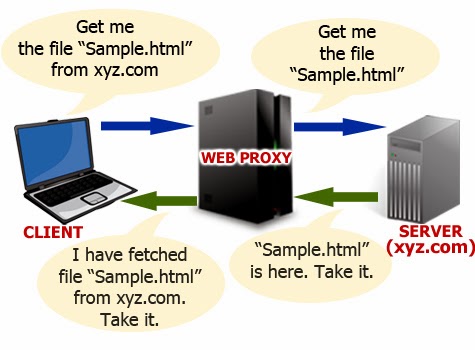
In a computer network, a proxy server is any computer system offering a service that acts as an intermediary between the two communicating parties, the client and the server. In the presence of a proxy server, there is no direct communication between the client and the server. Instead, the client connects to the proxy server and sends requests for resources such as a document, web page or a file that resides on a remote server. The proxy server handles this request by fetching the required resources from the remote server and forwarding the same to the client.

How Proxy Server Works?

An illustration of how a proxy server works is shown below:


As shown in the above example, whenever the client connects to a web proxy server and makes a request for the resources (in this case, “Sample.html”) that reside on a remote server (in this case, xyz.com), the proxy server forwards this request to the target server on behalf of the client, so as to fetch the requested resource and deliver it back to the client. An example of client can be a user operated computer that is connected to the Internet.

Types of Proxy Servers and their Uses:

1. Forward Proxies

A forward proxy is the same one described above where the proxy server forwards the client’s request to the target server to establish a communication between the two. Here the client specifies the resources to be fetched and the target server to connect to, so that the forward proxy server acts accordingly. Except forreverse proxy (discussed in the latter part of this article), all other types of proxy servers described in this article falls under forward proxy.

2. Open Proxy

An open proxy is a type of forwarding proxy that is openly available to any Internet user. Most often, an open proxy is used by Internet users to conceal their IP address so that they remain anonymous during their web activity. The following are some of the web proxies that fall under the category of open proxy:

Anonymous Proxy

An anonymous proxy is a type of open proxy that conceals IP address of Internet users so that the target server cannot identify the origin of the requesting client. However, an anonymous proxy identifies itself as a proxy server but still manages to maintain the anonymity of the users.

Distorting Proxy

This type of proxy server identifies itself as a proxy, but reveals an incorrect IP address of the client to the target server.

High Anonymity Proxy (Elite Proxy)

An elite proxy provides maximum anonymity as it neither identifies itself as a proxy nor reveals the original IP address of the client. In most cases, users have to pay for this type of proxy as it is seldom available freely on the Internet.

3. Reverse Proxy

Unlike a forwarding proxy where the client knows that it is connecting through a proxy, a reverse proxyappears to the client as an ordinary server. However, when the client requests resources from this server, it forwards those requests to the target server (actual server where the resources reside) so as to fetch back the requested resource and forward the same to the client. Here, the client is given an impression that it is connecting to the actual server, but in reality there exists a reverse proxy residing between the client and the actual server.
Reverse proxies are often used to reduce load on the actual server by load balancing, to enhance security and to cache static content, so that they can be served faster to the client. Often big companies like Google which gets a large number of hits maintain a reverse proxy so as to enhance the performance of their servers. It is not a surprise that whenever you are connecting to google.com, you are only connecting to a reverse proxy that forwards your search queries to the actual servers to return the results back to you

Read More
Designed By Seo Blogger Templates